PerfectServe Clinical Collab5.9.1
Publisher Description


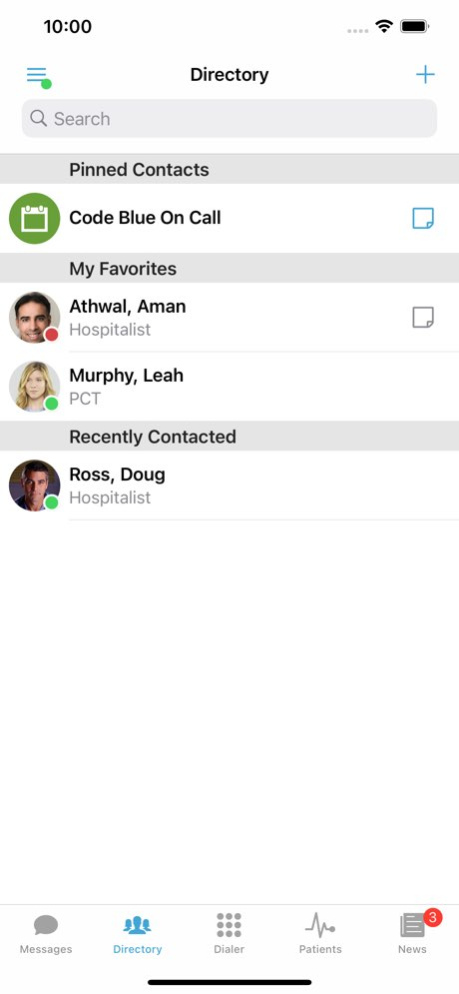

PerfectServe Clinical Collaboration is an enterprise cloud-based communications platform built specifically for healthcare. Our solution provides secure HIPAA compliant texting, an answering service, pager replacement, on-call schedules, and clinical integration with the EMR all on one easy to use platform.
Note: You must have an account enabled on PerfectServe Clinical Collaboration before you can use this application.
Main functions of our offering include:
. Communications: Our mobile applications allow for real-time texting and voice communication between clinicians. Multimedia messaging with photos, voice, and attachments are supported as are the ability to record and deliver voicemails when clinicians are busy with patients.
. Reliable Messaging: PerfectServe Clinical Collaboration provides a persistent and reliable messaging layer that is able to deliver time sensitive messages to users on a multitude of delivery channels. PerfectServe Clinical Collaboration detects when a user’s device has data connectivity issues, and routes the message accordingly based on a user’s network conditions and availability.
. Directory Integration: PerfectServe Clinical Collaboration is seamlessly deployed and managed through the organizations existing Microsoft Active Directory Infrastructure.
. Call Center Integration: The ability to send messages from the existing call center software and systems allows for rapid deployment with minimal disruption to existing call center workflow.
. On Call Scheduling: PerfectServe Clinical Collaboration has the leading on-call scheduling platform, including escalations, shared schedules, round-robin load balancing based on provider load, and more. In addition, we are the only communications platform that provides real-time integration with Amion, QGenda, Tangiers, as well as home grown and legacy scheduling platforms.
. Phone System Integration: PerfectServe Clinical Collaboration integrates with both SIP based and legacy (non SIP based) hospital phone platforms. We are the only communications provider that is able to support a transition strategy from legacy circuit switch PBX systems to the SIP domain. Make and receive calls on your iOS device using VoIP as an extension of the hospital phone platform.
. Clinical Integration: PerfectServe Clinical Collaboration provides Patient Centric Messaging - the ability to track all messages against a patient and have two-way synchronization with the EMR.
. Nurse Mobility: Existing nurse call systems can be mobilized for nurses through integration with room alarms as well as patient assignments.
Version History This update includes minor improvements and bug fixes. 5.9.1 Sep 28 This update includes support for the newest iOS and WatchOS versions, as well as technical improvements. 5.9.0 Sep 10 This release includes technical improvements, and resolves a bug where the app would freeze if the keyboard was dismissed at a slow speed. 5.8.1 Aug 24 With this release, you can now mark Emergency Alert messages as “done” from your inbox. This release also increases the minimum supported iOS version to iOS 17. 5.8.0 Aug 4 This release includes stability improvements and bug fixes. 5.7.2 Jul 8 This release improves role selection in the Clinical Collaboration app. Multi-select is now enabled by default and a new "Select All" option streamlines assuming multiple roles. 5.7.1 Jun 15 This is primarily a stability release for iOS, with updates to keep the platform compatible and operationally sound. 5.7.0 May 26 Resolved an issue that prevented shift users from skipping or disabling auto‑logout. 5.6.1 Mar 5 With this release, Clinical Collaboration now supports the ability to Leave a Thread (permission based) on the mobile app. 5.6 Feb 17 Resolved an issue where Pendo guides could not be launched in the Clinical Collaboration iOS app 5.5.1 Jan 15 We’re excited to announce that as part of this release our iOS mobile app will now support integrating with Microsoft Intune Mobile Application Management (MAM)! Interested in implementing this new login workflow? Please engage with your Customer Success or Services representatives to kick off discovery and learn how to enable this functionality for your organization. We look forward to hearing how this update benefits your clinicians! 5.5 12/11/2025 Resolved an issue where cached logins were showing during SSO login for shared devices 5.4.1 10/27/2025 You can now Bulk Mark Done in the iOS app—just like on web. Select multiple threads or use “Select All” to process the bulk action. We’ve also updated the Messaging Tab: the Compose button now appears in the bottom right. This makes composing messages easier and Collab’s most prominent action. Users with Apple Watch Series 9+ can now use the Double Tap gesture to quickly interact with Clinical Collaboration notifications—making responses faster and more intuitive. 5.4.0 10/08/2025 - Resolved an issue where users were getting an extra unread message reminder once they had read the thread
- 5.3.1 06/16/2025 The Enterprise Login, Account Selection and Password screens will now have a Back button added to them. For organizations that leverage PFC, with this release they will now have the ability to message patients and their family members in a group message. Additionally, clinicians will be able to click the participant icon in the top-right corner of a PFC thread to view the patient and any associated family members involved in the conversation. 5.3.0 06/04/2025 Resolved an issue where users with View My Patient permission are unable to see patient cards in a message 5.2.1 04/22/2025 As part of this release, users will see a new option for Enterprise Login. Upon selection, the mobile app will navigate to the Enterprise Domain screen, where users can enter their account name. If the entered name matches an account with SSO configured, users will be directed to their organization’s SSO login page. Thus bypassing the need for an email associated with their PerfectServe account. 5.2 03/20/2025 Resolve an issue where in certain use cases a user can read a message, and still receive the Unread Message reminder alert after the message has been read and the app is closed. 5.1.1 02/10/2025 Introduced a new permission where an admin can limit a user’s ability to manage their own user-level routing rules. This new permission is now honored with this release. 5.1.0 01/28/2025 Updated icon to include "Collaboration" 5.0.1 01/09/2025 We’re excited to share some updates to our product branding that reflect our ongoing commitment to simplifying and enhancing your experience as a PerfectServe user. As part of our updated branding, we’ve unified the names and visuals across all of our products to make PerfectServe the central hub for your clinical communication and scheduling needs. While you may have known us as Telmediq in the past, you’ll notice the updated name — PerfectServe Clinical Collaboration — and consistent branding throughout our platform. This alignment not only strengthens the connection between the products you rely on, but it also makes it clear that they all benefit from the expertise, innovation, and reliability that PerfectServe delivers. 5.0 01/07/2025 Resolved a class of call quality issues related to audio buffer management. 4.14.4 12/23/2024 Updated a core dependency to address a class of call quality issues involving one way audio or no audio when making or receiving calls. 4.13.3 12/05/2024 Resolved an issue with directory searching querying results in correct order 4.13.2 11/20/2024 Resolved an issue with the patient list not displaying if a default patient list was not selecteted 4.13.1 11/08/2024
About PerfectServe Clinical Collab
The company that develops PerfectServe Clinical Collab is SmartPager Systems Inc.. The latest version released by its developer is 5.9.1.
To install PerfectServe Clinical Collab on your iOS device, just click the green Continue To App button above to start the installation process. The app is listed on our website since 2026-10-06 and was downloaded 1 times. We have already checked if the download link is safe, however for your own protection we recommend that you scan the downloaded app with your antivirus. Your antivirus may detect the PerfectServe Clinical Collab as malware if the download link is broken.
How to install PerfectServe Clinical Collab on your iOS device:
- Click on the Continue To App button on our website. This will redirect you to the App Store.
- Once the PerfectServe Clinical Collab is shown in the iTunes listing of your iOS device, you can start its download and installation. Tap on the GET button to the right of the app to start downloading it.
- If you are not logged-in the iOS appstore app, you'll be prompted for your your Apple ID and/or password.
- After PerfectServe Clinical Collab is downloaded, you'll see an INSTALL button to the right. Tap on it to start the actual installation of the iOS app.
- Once installation is finished you can tap on the OPEN button to start it. Its icon will also be added to your device home screen.
Program Details
System requirements
Download information
Pricing
Version History
version 5.9.1
posted on 2026-10-06
Version History This update includes minor improvements and bug fixes. 5.9.1 Sep 28 This update includes support for the newest iOS and WatchOS versions, as well as technical improvements. 5.9.0 Sep 10 This release includes technical improvements, and resolves a bug where the app would freeze if the keyboard was dismissed at a slow speed. 5.8.1 Aug 24 With this release, you can now mark Emergency Alert messages as “done” from your inbox. This release also increases the minimum supported iOS version to iOS 17. 5.8.0 Aug 4 This release includes stability improvements and bug fixes. 5.7.2 Jul 8 This release improves role selection in the Clinical Collaboration app. Multi-select is now enabled by default and a new "Select All" option streamlines assuming multiple roles. 5.7.1 Jun 15 This is primarily a stability release for iOS, with updates to keep the platform compatible and operationally sound. 5.7.0 May 26 Resolved an issue that prevented shift users from skipping or disabling auto‑logout. 5.6.1 Mar 5 With this release, Clinical Collaboration now supports the ability to Leave a Thread (permission based) on the mobile app. 5.6 Feb 17 Resolved an issue where Pendo guides could not be launched in the Clinical Collaboration iOS app 5.5.1 Jan 15 We’re excited to announce that as part of this release our iOS mobile app will now support integrating with Microsoft Intune Mobile Application Management (MAM)! Interested in implementing this new login workflow? Please engage with your Customer Success or Services representatives to kick off discovery and learn how to enable this functionality for your organization. We look forward to hearing how this update benefits your clinicians! 5.5 12/11/2025 Resolved an issue where cached logins were showing during SSO login for shared devices 5.4.1 10/27/2025 You can now Bulk Mark Done in the iOS app—just like on web. Select multiple threads or use “Select All” to process the bulk action. We’ve also updated the Messaging Tab: the Compose button now appears in the bottom right. This makes composing messages easier and Collab’s most prominent action. Users with Apple Watch Series 9+ can now use the Double Tap gesture to quickly interact with Clinical Collaboration notifications—making responses faster and more intuitive. 5.4.0 10/08/2025 - Resolved an issue where users were getting an extra unread message reminder once they had read the thread
- 5.3.1 06/16/2025 The Enterprise Login, Account Selection and Password screens will now have a Back button added to them. For organizations that leverage PFC, with this release they will now have the ability to message patients and their family members in a group message. Additionally, clinicians will be able to click the participant icon in the top-right corner of a PFC thread to view the patient and any associated family members involved in the conversation. 5.3.0 06/04/2025 Resolved an issue where users with View My Patient permission are unable to see patient cards in a message 5.2.1 04/22/2025 As part of this release, users will see a new option for Enterprise Login. Upon selection, the mobile app will navigate to the Enterprise Domain screen, where users can enter their account name. If the entered name matches an account with SSO configured, users will be directed to their organization’s SSO login page. Thus bypassing the need for an email associated with their PerfectServe account. 5.2 03/20/2025 Resolve an issue where in certain use cases a user can read a message, and still receive the Unread Message reminder alert after the message has been read and the app is closed. 5.1.1 02/10/2025 Introduced a new permission where an admin can limit a user’s ability to manage their own user-level routing rules. This new permission is now honored with this release. 5.1.0 01/28/2025 Updated icon to include "Collaboration" 5.0.1 01/09/2025 We’re excited to share some updates to our product branding that reflect our ongoing commitment to simplifying and enhancing your experience as a PerfectServe user. As part of our updated branding, we’ve unified the names and visuals across all of our products to make PerfectServe the central hub for your clinical communication and scheduling needs. While you may have known us as Telmediq in the past, you’ll notice the updated name — PerfectServe Clinical Collaboration — and consistent branding throughout our platform. This alignment not only strengthens the connection between the products you rely on, but it also makes it clear that they all benefit from the expertise, innovation, and reliability that PerfectServe delivers. 5.0 01/07/2025 Resolved a class of call quality issues related to audio buffer management. 4.14.4 12/23/2024 Updated a core dependency to address a class of call quality issues involving one way audio or no audio when making or receiving calls. 4.13.3 12/05/2024 Resolved an issue with directory searching querying results in correct order 4.13.2 11/20/2024 Resolved an issue with the patient list not displaying if a default patient list was not selecteted 4.13.1 11/08/2024
version 5.9.1
posted on 2026-10-02
Version History This update includes minor improvements and bug fixes. 5.9.1 3d ago This update includes support for the newest iOS and WatchOS versions, as well as technical improvements. 5.9.0 Sep 10 This release includes technical improvements, and resolves a bug where the app would freeze if the keyboard was dismissed at a slow speed. 5.8.1 Aug 24 With this release, you can now mark Emergency Alert messages as “done” from your inbox. This release also increases the minimum supported iOS version to iOS 17. 5.8.0 Aug 4 This release includes stability improvements and bug fixes. 5.7.2 Jul 8 This release improves role selection in the Clinical Collaboration app. Multi-select is now enabled by default and a new "Select All" option streamlines assuming multiple roles. 5.7.1 Jun 15 This is primarily a stability release for iOS, with updates to keep the platform compatible and operationally sound. 5.7.0 May 26 Resolved an issue that prevented shift users from skipping or disabling auto‑logout. 5.6.1 Mar 5 With this release, Clinical Collaboration now supports the ability to Leave a Thread (permission based) on the mobile app. 5.6 Feb 17 Resolved an issue where Pendo guides could not be launched in the Clinical Collaboration iOS app 5.5.1 Jan 15 We’re excited to announce that as part of this release our iOS mobile app will now support integrating with Microsoft Intune Mobile Application Management (MAM)! Interested in implementing this new login workflow? Please engage with your Customer Success or Services representatives to kick off discovery and learn how to enable this functionality for your organization. We look forward to hearing how this update benefits your clinicians! 5.5 12/11/2025 Resolved an issue where cached logins were showing during SSO login for shared devices 5.4.1 10/27/2025 You can now Bulk Mark Done in the iOS app—just like on web. Select multiple threads or use “Select All” to process the bulk action. We’ve also updated the Messaging Tab: the Compose button now appears in the bottom right. This makes composing messages easier and Collab’s most prominent action. Users with Apple Watch Series 9+ can now use the Double Tap gesture to quickly interact with Clinical Collaboration notifications—making responses faster and more intuitive. 5.4.0 10/08/2025 - Resolved an issue where users were getting an extra unread message reminder once they had read the thread
- 5.3.1 06/16/2025 The Enterprise Login, Account Selection and Password screens will now have a Back button added to them. For organizations that leverage PFC, with this release they will now have the ability to message patients and their family members in a group message. Additionally, clinicians will be able to click the participant icon in the top-right corner of a PFC thread to view the patient and any associated family members involved in the conversation. 5.3.0 06/04/2025 Resolved an issue where users with View My Patient permission are unable to see patient cards in a message 5.2.1 04/22/2025 As part of this release, users will see a new option for Enterprise Login. Upon selection, the mobile app will navigate to the Enterprise Domain screen, where users can enter their account name. If the entered name matches an account with SSO configured, users will be directed to their organization’s SSO login page. Thus bypassing the need for an email associated with their PerfectServe account. 5.2 03/20/2025 Resolve an issue where in certain use cases a user can read a message, and still receive the Unread Message reminder alert after the message has been read and the app is closed. 5.1.1 02/10/2025 Introduced a new permission where an admin can limit a user’s ability to manage their own user-level routing rules. This new permission is now honored with this release. 5.1.0 01/28/2025 Updated icon to include "Collaboration" 5.0.1 01/09/2025 We’re excited to share some updates to our product branding that reflect our ongoing commitment to simplifying and enhancing your experience as a PerfectServe user. As part of our updated branding, we’ve unified the names and visuals across all of our products to make PerfectServe the central hub for your clinical communication and scheduling needs. While you may have known us as Telmediq in the past, you’ll notice the updated name — PerfectServe Clinical Collaboration — and consistent branding throughout our platform. This alignment not only strengthens the connection between the products you rely on, but it also makes it clear that they all benefit from the expertise, innovation, and reliability that PerfectServe delivers. 5.0 01/07/2025 Resolved a class of call quality issues related to audio buffer management. 4.14.4 12/23/2024 Updated a core dependency to address a class of call quality issues involving one way audio or no audio when making or receiving calls. 4.13.3 12/05/2024 Resolved an issue with directory searching querying results in correct order 4.13.2 11/20/2024 Resolved an issue with the patient list not displaying if a default patient list was not selecteted 4.13.1 11/08/2024
version 5.9.0
posted on 2026-09-25
Version History This update includes support for the newest iOS and WatchOS versions, as well as technical improvements. 5.9.0 Sep 10 This release includes technical improvements, and resolves a bug where the app would freeze if the keyboard was dismissed at a slow speed. 5.8.1 Aug 24 With this release, you can now mark Emergency Alert messages as “done” from your inbox. This release also increases the minimum supported iOS version to iOS 17. 5.8.0 Aug 4 This release includes stability improvements and bug fixes. 5.7.2 Jul 8 This release improves role selection in the Clinical Collaboration app. Multi-select is now enabled by default and a new "Select All" option streamlines assuming multiple roles. 5.7.1 Jun 15 This is primarily a stability release for iOS, with updates to keep the platform compatible and operationally sound. 5.7.0 May 26 Resolved an issue that prevented shift users from skipping or disabling auto‑logout. 5.6.1 Mar 5 With this release, Clinical Collaboration now supports the ability to Leave a Thread (permission based) on the mobile app. 5.6 Feb 17 Resolved an issue where Pendo guides could not be launched in the Clinical Collaboration iOS app 5.5.1 Jan 15 We’re excited to announce that as part of this release our iOS mobile app will now support integrating with Microsoft Intune Mobile Application Management (MAM)! Interested in implementing this new login workflow? Please engage with your Customer Success or Services representatives to kick off discovery and learn how to enable this functionality for your organization. We look forward to hearing how this update benefits your clinicians! 5.5 12/11/2025 Resolved an issue where cached logins were showing during SSO login for shared devices 5.4.1 10/27/2025 You can now Bulk Mark Done in the iOS app—just like on web. Select multiple threads or use “Select All” to process the bulk action. We’ve also updated the Messaging Tab: the Compose button now appears in the bottom right. This makes composing messages easier and Collab’s most prominent action. Users with Apple Watch Series 9+ can now use the Double Tap gesture to quickly interact with Clinical Collaboration notifications—making responses faster and more intuitive. 5.4.0 10/08/2025 - Resolved an issue where users were getting an extra unread message reminder once they had read the thread
- 5.3.1 06/16/2025 The Enterprise Login, Account Selection and Password screens will now have a Back button added to them. For organizations that leverage PFC, with this release they will now have the ability to message patients and their family members in a group message. Additionally, clinicians will be able to click the participant icon in the top-right corner of a PFC thread to view the patient and any associated family members involved in the conversation. 5.3.0 06/04/2025 Resolved an issue where users with View My Patient permission are unable to see patient cards in a message 5.2.1 04/22/2025 As part of this release, users will see a new option for Enterprise Login. Upon selection, the mobile app will navigate to the Enterprise Domain screen, where users can enter their account name. If the entered name matches an account with SSO configured, users will be directed to their organization’s SSO login page. Thus bypassing the need for an email associated with their PerfectServe account. 5.2 03/20/2025 Resolve an issue where in certain use cases a user can read a message, and still receive the Unread Message reminder alert after the message has been read and the app is closed. 5.1.1 02/10/2025 Introduced a new permission where an admin can limit a user’s ability to manage their own user-level routing rules. This new permission is now honored with this release. 5.1.0 01/28/2025 Updated icon to include "Collaboration" 5.0.1 01/09/2025 We’re excited to share some updates to our product branding that reflect our ongoing commitment to simplifying and enhancing your experience as a PerfectServe user. As part of our updated branding, we’ve unified the names and visuals across all of our products to make PerfectServe the central hub for your clinical communication and scheduling needs. While you may have known us as Telmediq in the past, you’ll notice the updated name — PerfectServe Clinical Collaboration — and consistent branding throughout our platform. This alignment not only strengthens the connection between the products you rely on, but it also makes it clear that they all benefit from the expertise, innovation, and reliability that PerfectServe delivers. 5.0 01/07/2025 Resolved a class of call quality issues related to audio buffer management. 4.14.4 12/23/2024 Updated a core dependency to address a class of call quality issues involving one way audio or no audio when making or receiving calls. 4.13.3 12/05/2024 Resolved an issue with directory searching querying results in correct order 4.13.2 11/20/2024 Resolved an issue with the patient list not displaying if a default patient list was not selecteted 4.13.1 11/08/2024 With the recent updates to the support contact number, users can now request a callback from Support, which will be directed to 877-844-7727. We made adjustments to the done messages settings within the mobile app to clarify when these settings are managed at the Account level. 4.13.0 10/30/2024
version 5.9.0
posted on 2026-09-11
Version History This update includes support for the newest iOS and WatchOS versions, as well as technical improvements. 5.9.0 17h ago This release includes technical improvements, and resolves a bug where the app would freeze if the keyboard was dismissed at a slow speed. 5.8.1 Aug 24 With this release, you can now mark Emergency Alert messages as “done” from your inbox. This release also increases the minimum supported iOS version to iOS 17. 5.8.0 Aug 4 This release includes stability improvements and bug fixes. 5.7.2 Jul 8 This release improves role selection in the Clinical Collaboration app. Multi-select is now enabled by default and a new "Select All" option streamlines assuming multiple roles. 5.7.1 Jun 15 This is primarily a stability release for iOS, with updates to keep the platform compatible and operationally sound. 5.7.0 May 26 Resolved an issue that prevented shift users from skipping or disabling auto‑logout. 5.6.1 Mar 5 With this release, Clinical Collaboration now supports the ability to Leave a Thread (permission based) on the mobile app. 5.6 Feb 17 Resolved an issue where Pendo guides could not be launched in the Clinical Collaboration iOS app 5.5.1 Jan 15 We’re excited to announce that as part of this release our iOS mobile app will now support integrating with Microsoft Intune Mobile Application Management (MAM)! Interested in implementing this new login workflow? Please engage with your Customer Success or Services representatives to kick off discovery and learn how to enable this functionality for your organization. We look forward to hearing how this update benefits your clinicians! 5.5 12/11/2025 Resolved an issue where cached logins were showing during SSO login for shared devices 5.4.1 10/27/2025 You can now Bulk Mark Done in the iOS app—just like on web. Select multiple threads or use “Select All” to process the bulk action. We’ve also updated the Messaging Tab: the Compose button now appears in the bottom right. This makes composing messages easier and Collab’s most prominent action. Users with Apple Watch Series 9+ can now use the Double Tap gesture to quickly interact with Clinical Collaboration notifications—making responses faster and more intuitive. 5.4.0 10/08/2025 - Resolved an issue where users were getting an extra unread message reminder once they had read the thread
- 5.3.1 06/16/2025 The Enterprise Login, Account Selection and Password screens will now have a Back button added to them. For organizations that leverage PFC, with this release they will now have the ability to message patients and their family members in a group message. Additionally, clinicians will be able to click the participant icon in the top-right corner of a PFC thread to view the patient and any associated family members involved in the conversation. 5.3.0 06/04/2025 Resolved an issue where users with View My Patient permission are unable to see patient cards in a message 5.2.1 04/22/2025 As part of this release, users will see a new option for Enterprise Login. Upon selection, the mobile app will navigate to the Enterprise Domain screen, where users can enter their account name. If the entered name matches an account with SSO configured, users will be directed to their organization’s SSO login page. Thus bypassing the need for an email associated with their PerfectServe account. 5.2 03/20/2025 Resolve an issue where in certain use cases a user can read a message, and still receive the Unread Message reminder alert after the message has been read and the app is closed. 5.1.1 02/10/2025 Introduced a new permission where an admin can limit a user’s ability to manage their own user-level routing rules. This new permission is now honored with this release. 5.1.0 01/28/2025 Updated icon to include "Collaboration" 5.0.1 01/09/2025 We’re excited to share some updates to our product branding that reflect our ongoing commitment to simplifying and enhancing your experience as a PerfectServe user. As part of our updated branding, we’ve unified the names and visuals across all of our products to make PerfectServe the central hub for your clinical communication and scheduling needs. While you may have known us as Telmediq in the past, you’ll notice the updated name — PerfectServe Clinical Collaboration — and consistent branding throughout our platform. This alignment not only strengthens the connection between the products you rely on, but it also makes it clear that they all benefit from the expertise, innovation, and reliability that PerfectServe delivers. 5.0 01/07/2025 Resolved a class of call quality issues related to audio buffer management. 4.14.4 12/23/2024 Updated a core dependency to address a class of call quality issues involving one way audio or no audio when making or receiving calls. 4.13.3 12/05/2024 Resolved an issue with directory searching querying results in correct order 4.13.2 11/20/2024 Resolved an issue with the patient list not displaying if a default patient list was not selecteted 4.13.1 11/08/2024 With the recent updates to the support contact number, users can now request a callback from Support, which will be directed to 877-844-7727. We made adjustments to the done messages settings within the mobile app to clarify when these settings are managed at the Account level. 4.13.0 10/30/2024
version 5.8.1
posted on 2026-09-04
Version History This release includes technical improvements, and resolves a bug where the app would freeze if the keyboard was dismissed at a slow speed. 5.8.1 Aug 24 With this release, you can now mark Emergency Alert messages as “done” from your inbox. This release also increases the minimum supported iOS version to iOS 17. 5.8.0 Aug 4 This release includes stability improvements and bug fixes. 5.7.2 Jul 8 This release improves role selection in the Clinical Collaboration app. Multi-select is now enabled by default and a new "Select All" option streamlines assuming multiple roles. 5.7.1 Jun 15 This is primarily a stability release for iOS, with updates to keep the platform compatible and operationally sound. 5.7.0 May 26 Resolved an issue that prevented shift users from skipping or disabling auto‑logout. 5.6.1 Mar 5 With this release, Clinical Collaboration now supports the ability to Leave a Thread (permission based) on the mobile app. 5.6 Feb 17 Resolved an issue where Pendo guides could not be launched in the Clinical Collaboration iOS app 5.5.1 Jan 15 We’re excited to announce that as part of this release our iOS mobile app will now support integrating with Microsoft Intune Mobile Application Management (MAM)! Interested in implementing this new login workflow? Please engage with your Customer Success or Services representatives to kick off discovery and learn how to enable this functionality for your organization. We look forward to hearing how this update benefits your clinicians! 5.5 12/11/2025 Resolved an issue where cached logins were showing during SSO login for shared devices 5.4.1 10/27/2025 You can now Bulk Mark Done in the iOS app—just like on web. Select multiple threads or use “Select All” to process the bulk action. We’ve also updated the Messaging Tab: the Compose button now appears in the bottom right. This makes composing messages easier and Collab’s most prominent action. Users with Apple Watch Series 9+ can now use the Double Tap gesture to quickly interact with Clinical Collaboration notifications—making responses faster and more intuitive. 5.4.0 10/08/2025 - Resolved an issue where users were getting an extra unread message reminder once they had read the thread
- 5.3.1 06/16/2025 The Enterprise Login, Account Selection and Password screens will now have a Back button added to them. For organizations that leverage PFC, with this release they will now have the ability to message patients and their family members in a group message. Additionally, clinicians will be able to click the participant icon in the top-right corner of a PFC thread to view the patient and any associated family members involved in the conversation. 5.3.0 06/04/2025 Resolved an issue where users with View My Patient permission are unable to see patient cards in a message 5.2.1 04/22/2025 As part of this release, users will see a new option for Enterprise Login. Upon selection, the mobile app will navigate to the Enterprise Domain screen, where users can enter their account name. If the entered name matches an account with SSO configured, users will be directed to their organization’s SSO login page. Thus bypassing the need for an email associated with their PerfectServe account. 5.2 03/20/2025 Resolve an issue where in certain use cases a user can read a message, and still receive the Unread Message reminder alert after the message has been read and the app is closed. 5.1.1 02/10/2025 Introduced a new permission where an admin can limit a user’s ability to manage their own user-level routing rules. This new permission is now honored with this release. 5.1.0 01/28/2025 Updated icon to include "Collaboration" 5.0.1 01/09/2025 We’re excited to share some updates to our product branding that reflect our ongoing commitment to simplifying and enhancing your experience as a PerfectServe user. As part of our updated branding, we’ve unified the names and visuals across all of our products to make PerfectServe the central hub for your clinical communication and scheduling needs. While you may have known us as Telmediq in the past, you’ll notice the updated name — PerfectServe Clinical Collaboration — and consistent branding throughout our platform. This alignment not only strengthens the connection between the products you rely on, but it also makes it clear that they all benefit from the expertise, innovation, and reliability that PerfectServe delivers. 5.0 01/07/2025 Resolved a class of call quality issues related to audio buffer management. 4.14.4 12/23/2024 Updated a core dependency to address a class of call quality issues involving one way audio or no audio when making or receiving calls. 4.13.3 12/05/2024 Resolved an issue with directory searching querying results in correct order 4.13.2 11/20/2024 Resolved an issue with the patient list not displaying if a default patient list was not selecteted 4.13.1 11/08/2024 With the recent updates to the support contact number, users can now request a callback from Support, which will be directed to 877-844-7727. We made adjustments to the done messages settings within the mobile app to clarify when these settings are managed at the Account level. 4.13.0 10/30/2024 - Resolved an issue where users badge count was not correctly updating once the message had been read
- Resolved an issue with iOS native screen mirror 4.12.1 09/18/2024
version 5.8.0
posted on 2026-08-22
Version History With this release, you can now mark Emergency Alert messages as “done” from your inbox. This release also increases the minimum supported iOS version to iOS 17. 5.8.0 Aug 4 This release includes stability improvements and bug fixes. 5.7.2 Jul 8 This release improves role selection in the Clinical Collaboration app. Multi-select is now enabled by default and a new "Select All" option streamlines assuming multiple roles. 5.7.1 Jun 15 This is primarily a stability release for iOS, with updates to keep the platform compatible and operationally sound. 5.7.0 May 26 Resolved an issue that prevented shift users from skipping or disabling auto‑logout. 5.6.1 Mar 5 With this release, Clinical Collaboration now supports the ability to Leave a Thread (permission based) on the mobile app. 5.6 Feb 17 Resolved an issue where Pendo guides could not be launched in the Clinical Collaboration iOS app 5.5.1 Jan 15 We’re excited to announce that as part of this release our iOS mobile app will now support integrating with Microsoft Intune Mobile Application Management (MAM)! Interested in implementing this new login workflow? Please engage with your Customer Success or Services representatives to kick off discovery and learn how to enable this functionality for your organization. We look forward to hearing how this update benefits your clinicians! 5.5 12/11/2025 Resolved an issue where cached logins were showing during SSO login for shared devices 5.4.1 10/27/2025 You can now Bulk Mark Done in the iOS app—just like on web. Select multiple threads or use “Select All” to process the bulk action. We’ve also updated the Messaging Tab: the Compose button now appears in the bottom right. This makes composing messages easier and Collab’s most prominent action. Users with Apple Watch Series 9+ can now use the Double Tap gesture to quickly interact with Clinical Collaboration notifications—making responses faster and more intuitive. 5.4.0 10/08/2025 - Resolved an issue where users were getting an extra unread message reminder once they had read the thread
- 5.3.1 06/16/2025 The Enterprise Login, Account Selection and Password screens will now have a Back button added to them. For organizations that leverage PFC, with this release they will now have the ability to message patients and their family members in a group message. Additionally, clinicians will be able to click the participant icon in the top-right corner of a PFC thread to view the patient and any associated family members involved in the conversation. 5.3.0 06/04/2025 Resolved an issue where users with View My Patient permission are unable to see patient cards in a message 5.2.1 04/22/2025 As part of this release, users will see a new option for Enterprise Login. Upon selection, the mobile app will navigate to the Enterprise Domain screen, where users can enter their account name. If the entered name matches an account with SSO configured, users will be directed to their organization’s SSO login page. Thus bypassing the need for an email associated with their PerfectServe account. 5.2 03/20/2025 Resolve an issue where in certain use cases a user can read a message, and still receive the Unread Message reminder alert after the message has been read and the app is closed. 5.1.1 02/10/2025 Introduced a new permission where an admin can limit a user’s ability to manage their own user-level routing rules. This new permission is now honored with this release. 5.1.0 01/28/2025 Updated icon to include "Collaboration" 5.0.1 01/09/2025 We’re excited to share some updates to our product branding that reflect our ongoing commitment to simplifying and enhancing your experience as a PerfectServe user. As part of our updated branding, we’ve unified the names and visuals across all of our products to make PerfectServe the central hub for your clinical communication and scheduling needs. While you may have known us as Telmediq in the past, you’ll notice the updated name — PerfectServe Clinical Collaboration — and consistent branding throughout our platform. This alignment not only strengthens the connection between the products you rely on, but it also makes it clear that they all benefit from the expertise, innovation, and reliability that PerfectServe delivers. 5.0 01/07/2025 Resolved a class of call quality issues related to audio buffer management. 4.14.4 12/23/2024 Updated a core dependency to address a class of call quality issues involving one way audio or no audio when making or receiving calls. 4.13.3 12/05/2024 Resolved an issue with directory searching querying results in correct order 4.13.2 11/20/2024 Resolved an issue with the patient list not displaying if a default patient list was not selecteted 4.13.1 11/08/2024 With the recent updates to the support contact number, users can now request a callback from Support, which will be directed to 877-844-7727. We made adjustments to the done messages settings within the mobile app to clarify when these settings are managed at the Account level. 4.13.0 10/30/2024 - Resolved an issue where users badge count was not correctly updating once the message had been read
- Resolved an issue with iOS native screen mirror 4.12.1 09/18/2024 The iOS 4.12 release will incorporate Emergency Alerts for the mobile app and CarPlay. This release will also add further support for Hands Free (including Apple Watch). When composing messages using Siri, users can now hear or see the title of each potential recipient. If your organization would like to learn more about our Hands Free offerings please engage your customer success team. 4.12.0 08/29/2024
version 5.7.2
posted on 2026-07-27
Version History This release includes stability improvements and bug fixes. 5.7.2 Jul 8 This release improves role selection in the Clinical Collaboration app. Multi-select is now enabled by default and a new "Select All" option streamlines assuming multiple roles. 5.7.1 Jun 15 This is primarily a stability release for iOS, with updates to keep the platform compatible and operationally sound. 5.7.0 May 26 Resolved an issue that prevented shift users from skipping or disabling auto‑logout. 5.6.1 Mar 5 With this release, Clinical Collaboration now supports the ability to Leave a Thread (permission based) on the mobile app. 5.6 Feb 17 Resolved an issue where Pendo guides could not be launched in the Clinical Collaboration iOS app 5.5.1 Jan 15 We’re excited to announce that as part of this release our iOS mobile app will now support integrating with Microsoft Intune Mobile Application Management (MAM)! Interested in implementing this new login workflow? Please engage with your Customer Success or Services representatives to kick off discovery and learn how to enable this functionality for your organization. We look forward to hearing how this update benefits your clinicians! 5.5 12/11/2025 Resolved an issue where cached logins were showing during SSO login for shared devices 5.4.1 10/27/2025 You can now Bulk Mark Done in the iOS app—just like on web. Select multiple threads or use “Select All” to process the bulk action. We’ve also updated the Messaging Tab: the Compose button now appears in the bottom right. This makes composing messages easier and Collab’s most prominent action. Users with Apple Watch Series 9+ can now use the Double Tap gesture to quickly interact with Clinical Collaboration notifications—making responses faster and more intuitive. 5.4.0 10/08/2025 - Resolved an issue where users were getting an extra unread message reminder once they had read the thread
- 5.3.1 06/16/2025 The Enterprise Login, Account Selection and Password screens will now have a Back button added to them. For organizations that leverage PFC, with this release they will now have the ability to message patients and their family members in a group message. Additionally, clinicians will be able to click the participant icon in the top-right corner of a PFC thread to view the patient and any associated family members involved in the conversation. 5.3.0 06/04/2025 Resolved an issue where users with View My Patient permission are unable to see patient cards in a message 5.2.1 04/22/2025 As part of this release, users will see a new option for Enterprise Login. Upon selection, the mobile app will navigate to the Enterprise Domain screen, where users can enter their account name. If the entered name matches an account with SSO configured, users will be directed to their organization’s SSO login page. Thus bypassing the need for an email associated with their PerfectServe account. 5.2 03/20/2025 Resolve an issue where in certain use cases a user can read a message, and still receive the Unread Message reminder alert after the message has been read and the app is closed. 5.1.1 02/10/2025 Introduced a new permission where an admin can limit a user’s ability to manage their own user-level routing rules. This new permission is now honored with this release. 5.1.0 01/28/2025 Updated icon to include "Collaboration" 5.0.1 01/09/2025 We’re excited to share some updates to our product branding that reflect our ongoing commitment to simplifying and enhancing your experience as a PerfectServe user. As part of our updated branding, we’ve unified the names and visuals across all of our products to make PerfectServe the central hub for your clinical communication and scheduling needs. While you may have known us as Telmediq in the past, you’ll notice the updated name — PerfectServe Clinical Collaboration — and consistent branding throughout our platform. This alignment not only strengthens the connection between the products you rely on, but it also makes it clear that they all benefit from the expertise, innovation, and reliability that PerfectServe delivers. 5.0 01/07/2025 Resolved a class of call quality issues related to audio buffer management. 4.14.4 12/23/2024 Updated a core dependency to address a class of call quality issues involving one way audio or no audio when making or receiving calls. 4.13.3 12/05/2024 Resolved an issue with directory searching querying results in correct order 4.13.2 11/20/2024 Resolved an issue with the patient list not displaying if a default patient list was not selecteted 4.13.1 11/08/2024 With the recent updates to the support contact number, users can now request a callback from Support, which will be directed to 877-844-7727. We made adjustments to the done messages settings within the mobile app to clarify when these settings are managed at the Account level. 4.13.0 10/30/2024 - Resolved an issue where users badge count was not correctly updating once the message had been read
- Resolved an issue with iOS native screen mirror 4.12.1 09/18/2024 The iOS 4.12 release will incorporate Emergency Alerts for the mobile app and CarPlay. This release will also add further support for Hands Free (including Apple Watch). When composing messages using Siri, users can now hear or see the title of each potential recipient. If your organization would like to learn more about our Hands Free offerings please engage your customer success team. 4.12.0 08/29/2024 Resolved a crash with Shift take over for an account being in Guam timezone 4.11.4 07/23/2024
version 5.7.1
posted on 2026-06-30
Version History This release improves role selection in the Clinical Collaboration app. Multi-select is now enabled by default and a new "Select All" option streamlines assuming multiple roles. 5.7.1 Jun 15 This is primarily a stability release for iOS, with updates to keep the platform compatible and operationally sound. 5.7.0 May 26 Resolved an issue that prevented shift users from skipping or disabling auto‑logout. 5.6.1 Mar 5 With this release, Clinical Collaboration now supports the ability to Leave a Thread (permission based) on the mobile app. 5.6 Feb 17 Resolved an issue where Pendo guides could not be launched in the Clinical Collaboration iOS app 5.5.1 Jan 15 We’re excited to announce that as part of this release our iOS mobile app will now support integrating with Microsoft Intune Mobile Application Management (MAM)! Interested in implementing this new login workflow? Please engage with your Customer Success or Services representatives to kick off discovery and learn how to enable this functionality for your organization. We look forward to hearing how this update benefits your clinicians! 5.5 12/11/2025 Resolved an issue where cached logins were showing during SSO login for shared devices 5.4.1 10/27/2025 You can now Bulk Mark Done in the iOS app—just like on web. Select multiple threads or use “Select All” to process the bulk action. We’ve also updated the Messaging Tab: the Compose button now appears in the bottom right. This makes composing messages easier and Collab’s most prominent action. Users with Apple Watch Series 9+ can now use the Double Tap gesture to quickly interact with Clinical Collaboration notifications—making responses faster and more intuitive. 5.4.0 10/08/2025 - Resolved an issue where users were getting an extra unread message reminder once they had read the thread
- 5.3.1 06/16/2025 The Enterprise Login, Account Selection and Password screens will now have a Back button added to them. For organizations that leverage PFC, with this release they will now have the ability to message patients and their family members in a group message. Additionally, clinicians will be able to click the participant icon in the top-right corner of a PFC thread to view the patient and any associated family members involved in the conversation. 5.3.0 06/04/2025 Resolved an issue where users with View My Patient permission are unable to see patient cards in a message 5.2.1 04/22/2025 As part of this release, users will see a new option for Enterprise Login. Upon selection, the mobile app will navigate to the Enterprise Domain screen, where users can enter their account name. If the entered name matches an account with SSO configured, users will be directed to their organization’s SSO login page. Thus bypassing the need for an email associated with their PerfectServe account. 5.2 03/20/2025 Resolve an issue where in certain use cases a user can read a message, and still receive the Unread Message reminder alert after the message has been read and the app is closed. 5.1.1 02/10/2025 Introduced a new permission where an admin can limit a user’s ability to manage their own user-level routing rules. This new permission is now honored with this release. 5.1.0 01/28/2025 Updated icon to include "Collaboration" 5.0.1 01/09/2025 We’re excited to share some updates to our product branding that reflect our ongoing commitment to simplifying and enhancing your experience as a PerfectServe user. As part of our updated branding, we’ve unified the names and visuals across all of our products to make PerfectServe the central hub for your clinical communication and scheduling needs. While you may have known us as Telmediq in the past, you’ll notice the updated name — PerfectServe Clinical Collaboration — and consistent branding throughout our platform. This alignment not only strengthens the connection between the products you rely on, but it also makes it clear that they all benefit from the expertise, innovation, and reliability that PerfectServe delivers. 5.0 01/07/2025 Resolved a class of call quality issues related to audio buffer management. 4.14.4 12/23/2024 Updated a core dependency to address a class of call quality issues involving one way audio or no audio when making or receiving calls. 4.13.3 12/05/2024 Resolved an issue with directory searching querying results in correct order 4.13.2 11/20/2024 Resolved an issue with the patient list not displaying if a default patient list was not selecteted 4.13.1 11/08/2024 With the recent updates to the support contact number, users can now request a callback from Support, which will be directed to 877-844-7727. We made adjustments to the done messages settings within the mobile app to clarify when these settings are managed at the Account level. 4.13.0 10/30/2024 - Resolved an issue where users badge count was not correctly updating once the message had been read
- Resolved an issue with iOS native screen mirror 4.12.1 09/18/2024 The iOS 4.12 release will incorporate Emergency Alerts for the mobile app and CarPlay. This release will also add further support for Hands Free (including Apple Watch). When composing messages using Siri, users can now hear or see the title of each potential recipient. If your organization would like to learn more about our Hands Free offerings please engage your customer success team. 4.12.0 08/29/2024 Resolved a crash with Shift take over for an account being in Guam timezone 4.11.4 07/23/2024 Resolved an issue on OS 16 that impacted searching on the Telmediq directory. Resolved an issue with title not populating correctly beside a user’s name in a message thread. Resolved an issue with SSO integrations on logout. 4.11.3 06/27/2024
version 5.7.0
posted on 2026-06-06
Version History This is primarily a stability release for iOS, with updates to keep the platform compatible and operationally sound. 5.7.0 May 26 Resolved an issue that prevented shift users from skipping or disabling auto‑logout. 5.6.1 Mar 5 With this release, Clinical Collaboration now supports the ability to Leave a Thread (permission based) on the mobile app. 5.6 Feb 17 Resolved an issue where Pendo guides could not be launched in the Clinical Collaboration iOS app 5.5.1 Jan 15 We’re excited to announce that as part of this release our iOS mobile app will now support integrating with Microsoft Intune Mobile Application Management (MAM)! Interested in implementing this new login workflow? Please engage with your Customer Success or Services representatives to kick off discovery and learn how to enable this functionality for your organization. We look forward to hearing how this update benefits your clinicians! 5.5 12/11/2025 Resolved an issue where cached logins were showing during SSO login for shared devices 5.4.1 10/27/2025 You can now Bulk Mark Done in the iOS app—just like on web. Select multiple threads or use “Select All” to process the bulk action. We’ve also updated the Messaging Tab: the Compose button now appears in the bottom right. This makes composing messages easier and Collab’s most prominent action. Users with Apple Watch Series 9+ can now use the Double Tap gesture to quickly interact with Clinical Collaboration notifications—making responses faster and more intuitive. 5.4.0 10/08/2025 - Resolved an issue where users were getting an extra unread message reminder once they had read the thread
- 5.3.1 06/16/2025 The Enterprise Login, Account Selection and Password screens will now have a Back button added to them. For organizations that leverage PFC, with this release they will now have the ability to message patients and their family members in a group message. Additionally, clinicians will be able to click the participant icon in the top-right corner of a PFC thread to view the patient and any associated family members involved in the conversation. 5.3.0 06/04/2025 Resolved an issue where users with View My Patient permission are unable to see patient cards in a message 5.2.1 04/22/2025 As part of this release, users will see a new option for Enterprise Login. Upon selection, the mobile app will navigate to the Enterprise Domain screen, where users can enter their account name. If the entered name matches an account with SSO configured, users will be directed to their organization’s SSO login page. Thus bypassing the need for an email associated with their PerfectServe account. 5.2 03/20/2025 Resolve an issue where in certain use cases a user can read a message, and still receive the Unread Message reminder alert after the message has been read and the app is closed. 5.1.1 02/10/2025 Introduced a new permission where an admin can limit a user’s ability to manage their own user-level routing rules. This new permission is now honored with this release. 5.1.0 01/28/2025 Updated icon to include "Collaboration" 5.0.1 01/09/2025 We’re excited to share some updates to our product branding that reflect our ongoing commitment to simplifying and enhancing your experience as a PerfectServe user. As part of our updated branding, we’ve unified the names and visuals across all of our products to make PerfectServe the central hub for your clinical communication and scheduling needs. While you may have known us as Telmediq in the past, you’ll notice the updated name — PerfectServe Clinical Collaboration — and consistent branding throughout our platform. This alignment not only strengthens the connection between the products you rely on, but it also makes it clear that they all benefit from the expertise, innovation, and reliability that PerfectServe delivers. 5.0 01/07/2025 Resolved a class of call quality issues related to audio buffer management. 4.14.4 12/23/2024 Updated a core dependency to address a class of call quality issues involving one way audio or no audio when making or receiving calls. 4.13.3 12/05/2024 Resolved an issue with directory searching querying results in correct order 4.13.2 11/20/2024 Resolved an issue with the patient list not displaying if a default patient list was not selecteted 4.13.1 11/08/2024 With the recent updates to the support contact number, users can now request a callback from Support, which will be directed to 877-844-7727. We made adjustments to the done messages settings within the mobile app to clarify when these settings are managed at the Account level. 4.13.0 10/30/2024 - Resolved an issue where users badge count was not correctly updating once the message had been read
- Resolved an issue with iOS native screen mirror 4.12.1 09/18/2024 The iOS 4.12 release will incorporate Emergency Alerts for the mobile app and CarPlay. This release will also add further support for Hands Free (including Apple Watch). When composing messages using Siri, users can now hear or see the title of each potential recipient. If your organization would like to learn more about our Hands Free offerings please engage your customer success team. 4.12.0 08/29/2024 Resolved a crash with Shift take over for an account being in Guam timezone 4.11.4 07/23/2024 Resolved an issue on OS 16 that impacted searching on the Telmediq directory. Resolved an issue with title not populating correctly beside a user’s name in a message thread. Resolved an issue with SSO integrations on logout. 4.11.3 06/27/2024 - Streamlined login email page EULA acceptance
- Various bug fixes and improvements 4.11.2 06/13/2024
version 5.6.1
posted on 2026-03-05
Resolved an issue that prevented shift users from skipping or disabling auto‑logout.
